
Guide
WoW Forever controller support: the full button map, four bars, three sets and what still needs a keyboard
WoW Forever controller support is built into the game and works with all XInput-compatible controllers: press Escape, select Options, then choose Gamepad under Gameplay. Blizzard calls it a 'functional beta', so it works today but is not finished, and you should keep a keyboard within reach for typing in chat.
Everything below comes from Blizzard's 3 November 2026 article 'Explore WoW: Forever with a Gamepad', set out as tables you can keep open beside the game. Blizzard writes in Xbox button names, so this page does too. The last two sections cover what Blizzard has not said, starting with Macs.
Switching it on
There is nothing to install. Gamepad mode is a setting inside the game, and it replaces keyboard-and-mouse input once selected. Blizzard says the game ships with both Xbox and PlayStation button icons, so check which set your screen shows. Only the button names in Blizzard's written guide are Xbox-specific.
Once you are in, the Gamepad settings hold six groups of options. Blizzard names them but does not describe each one, so the table records only the names. Its advice is to set up your layout around the abilities you actually use, and to try moving, selecting targets and casting before you walk into a busy fight.
- Press Escape to open the Game Menu.
- Select Options.
- Choose Gamepad under Gameplay to switch from keyboard-and-mouse input.
- Adjust the Gamepad settings listed below.
- Arrange your spells on the action bars, as you would with a keyboard.
| Setting group | What Blizzard's post tells you about it |
|---|---|
| Camera | Named only. Zooming itself is a controller input: see the button map. |
| HUD Modifier | Named only. |
| Frame Focus Style | Named only. |
| Action Bars | Named only. The bars themselves are explained in the section on bars and sets. |
| Targeting | Named only. LB picks friendly targets and RB hostile ones. |
| Raid Targeting Options | Named only. Blizzard has not published how these work in a raid. |
The full button map
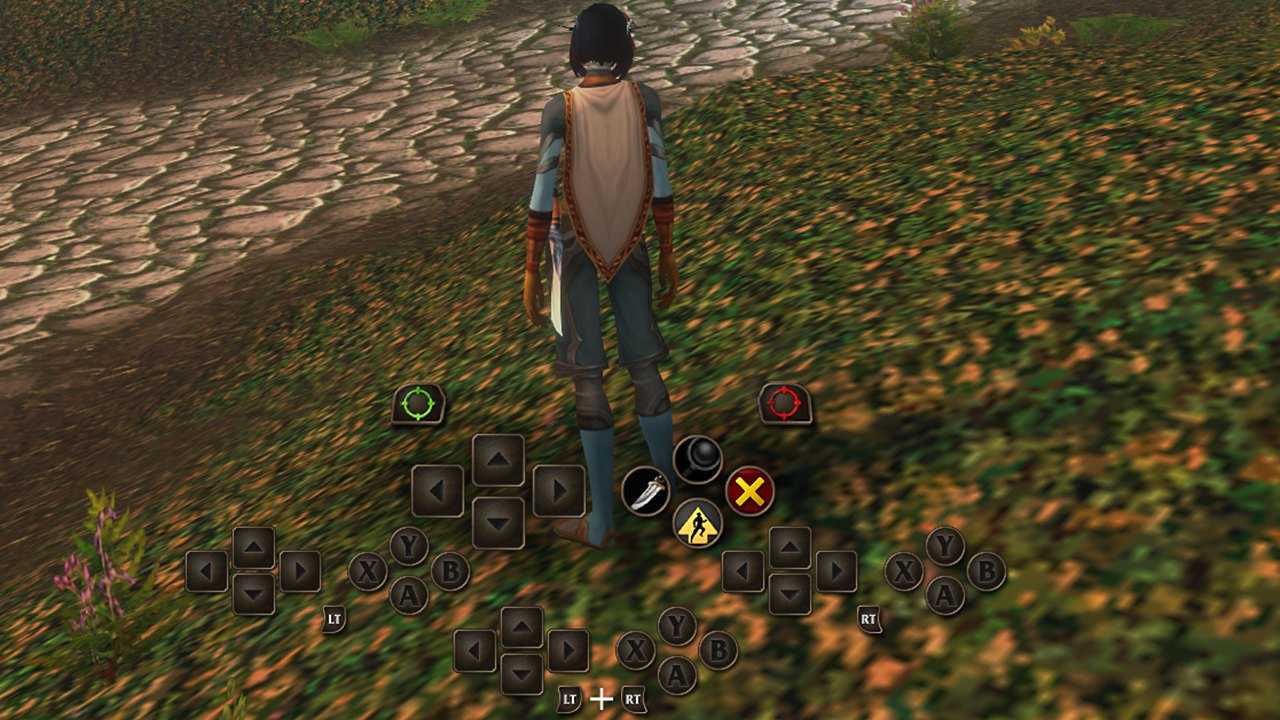
This is every control Blizzard's post assigns, in one table. Two details are easy to miss. The face buttons are not reserved for their listed jobs: Blizzard says 'These buttons also have spell functions.' And the triggers do nothing by themselves except move you to another bar while held. Let go and you are back on the default bar.
Blizzard has not published a PlayStation version of this list. Its post says PlayStation icons are included, but it does not give a button-by-button translation, so none is offered here.
| Control | What it does | Blizzard's note |
|---|---|---|
| Left stick | Moves your character | |
| Right stick | Adjusts the camera | Hold LB + RB and push it forward or back to zoom |
| LB (left bumper) | Selects a friendly target | |
| RB (right bumper) | Selects a hostile target | |
| LT (hold) | Switches to another action bar | Release to return to the default bar |
| RT (hold) | Switches to another action bar | Release to return to the default bar |
| LT + RT (hold) | Switches to another action bar | Release to return to the default bar |
| X | Interact | Also has a spell function |
| A | Jump | Also has a spell function |
| B | Back | Also has a spell function |
| Y | Inspect | Also has a spell function |
| Menu button | Opens the Main Menu | |
| View button (overlapping squares) | Change Focus Frame | Listed under menus and focus |
| D-pad directions | Hold action slots, as in Blizzard's 'Up' example | With LB + RB held, they reach sets and HUD elements instead |
Four bars, three sets, 84 slots
The number that sounds impossible is 84, and Blizzard's arithmetic holds. 'Each set contains four action bars with 28 slots combined, giving you 84 customizable spell and ability slots across all three sets.' Three sets of 28 is 84. Blizzard also says each bar 'uses the same button layout', so 28 slots over four bars is seven per bar. That seven is our division: Blizzard does not state it or list the seven buttons.
Two kinds of switching sit on top of each other. Triggers change the bar for as long as you hold them. Sets change only when you hold LB + RB and press Left or Right on the D-pad. Blizzard suggests separate sets for combat, utility abilities or frequently used actions, and the button layout stays the same as you switch, so you are not relearning anything.
Blizzard's Mage example shows what this does to a single button: four different spells on 'Up', one per bar. Blizzard is clear that 'These are example assignments, not fixed bindings', so none of these is a default you should expect to find. The HUD 'updates to show the abilities available on your active bar', which is how you check what a held trigger will do before you press.
| Layer | Count | How you reach it | Example on the Up button |
|---|---|---|---|
| Default bar | 7 slots | Nothing held | Up: Polymorph (Sheep) |
| LT bar | 7 slots | Hold LT | LT + Up: Fireball |
| RT bar | 7 slots | Hold RT | RT + Up: Frostbolt |
| LT + RT bar | 7 slots | Hold LT + RT | LT + RT + Up: Blizzard |
| One set | 28 slots | The four bars above | 4 spells on one button |
| All three sets | 84 slots | Hold LB + RB, press D-pad Left or Right | Up to 12 spells on one button |
Shoulder-button shortcuts and on-screen help
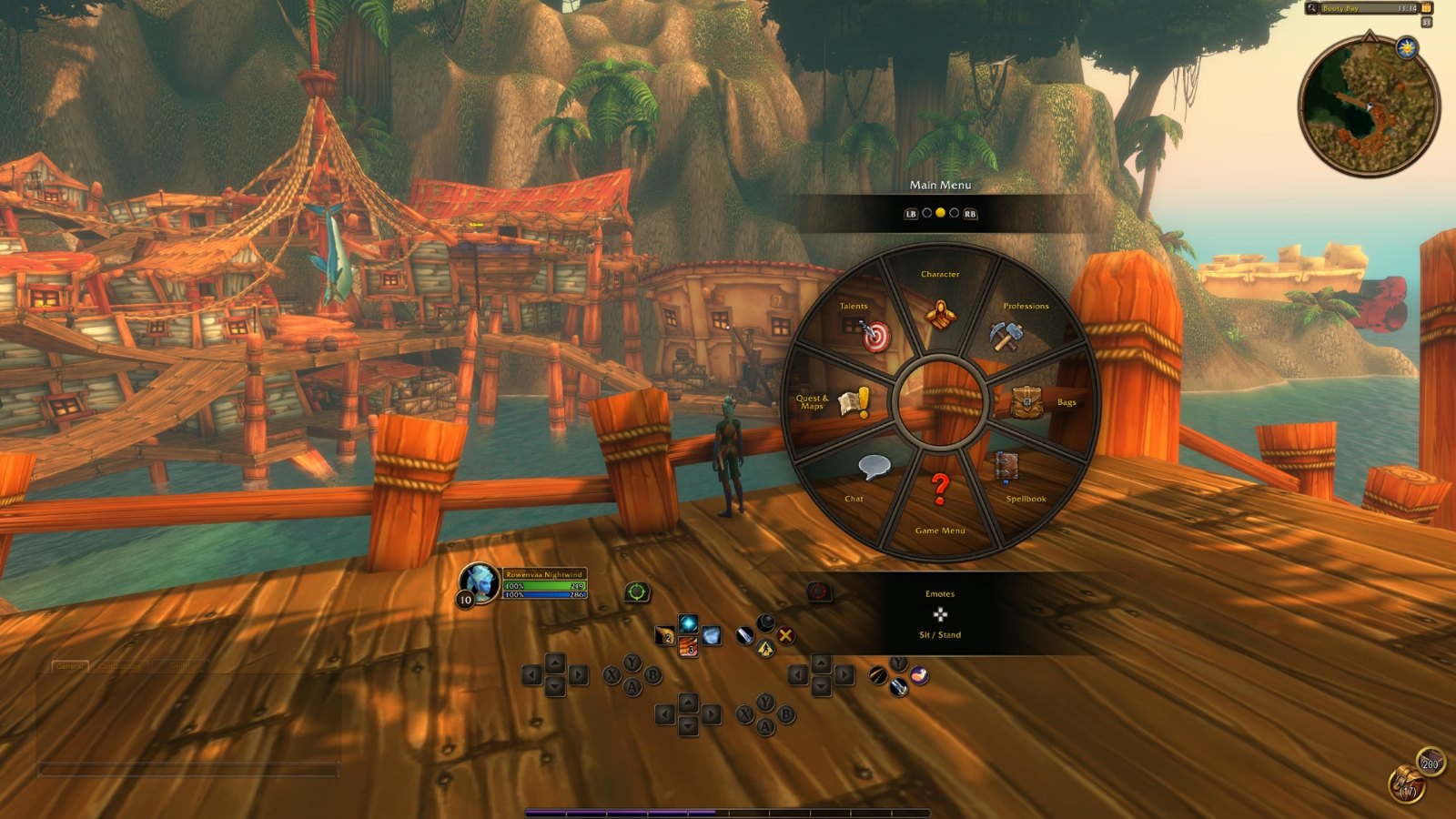
Holding both bumpers turns the face buttons and D-pad into shortcuts. The four HUD shortcuts (Backpack, Quest Tracker, Chat and Buffs) can also be reached through the main radial menu, so they save time rather than add features. The one to note is Chat: the shortcut takes you to chat, but 'typing in chat still requires a keyboard'.
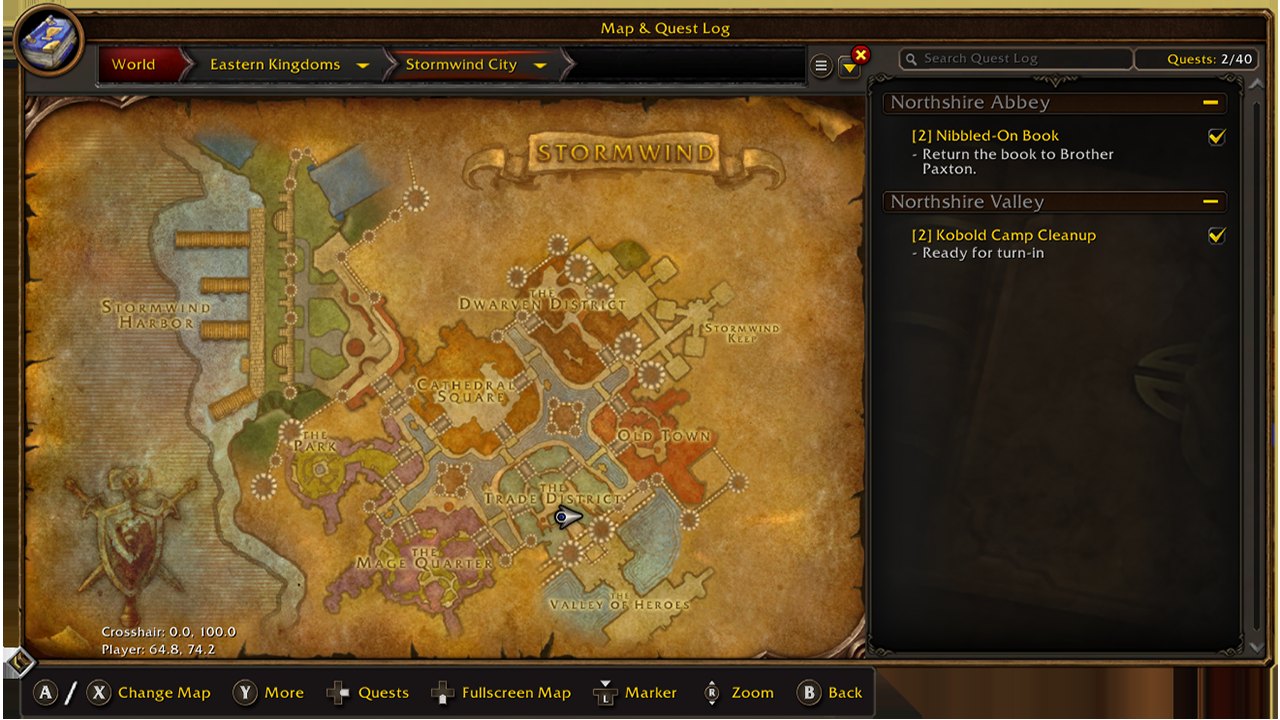
You do not have to memorise much of this. A gamepad legend sits in the upper-left corner of the main screen and expands when you take certain actions to show more options. Most screens also carry a footer showing the options for that panel. Blizzard's wording is 'Most screens', and it says plainly that not every screen has one yet, so a missing footer is a known gap and not something you broke.
| Hold LB + RB, then | Result |
|---|---|
| B | Open Backpack |
| D-pad Up | Access Quest Tracker |
| D-pad Down | Access Chat (a keyboard is still needed to type) |
| Y | Manage Buffs |
| D-pad Left or Right | Switch between the three action bar sets |
| Right stick forward or back | Zoom the camera in or out |
Targeting in a group, and the faction lighting
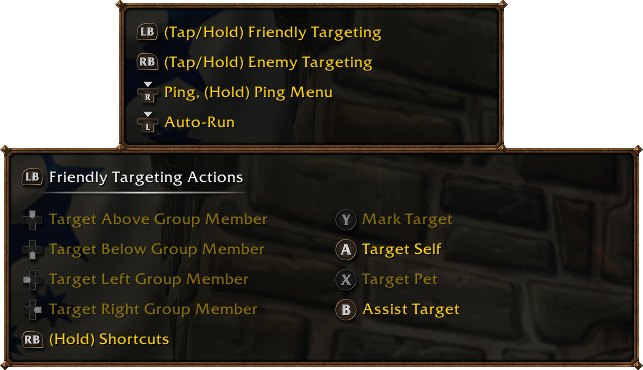
Blizzard's reasoning for separate bumpers is about roles: 'Tanking, healing, and dealing damage all call for selecting the right target at the right moment.' With LB for allies and RB for enemies, each side of that choice has its own button. Blizzard's post stops there. It does not say in writing how a repeated press moves between targets, or how a controller picks a target in a 40-player raid beyond naming the Raid Targeting Options group. Treat raid play as something to test in a low-stakes group first.
The lighting detail is real but narrow. 'On controllers with supported lighting, the light turns red for a Horde character and blue for an Alliance character.' Blizzard does not publish a list of controllers with supported lighting, and it does not mention any way to change the colours.
What 'beta' means here, and why you still need a keyboard
Blizzard states the status of WoW Forever controller support in five places and they agree on the substance, with one difference worth reading closely. The game shipped on 4 November with the gamepad labelled beta, and that label is Blizzard's own. Older coverage from before launch may use a different word, so go by the current Shop and news wording in the table.
The keyboard requirement is stated as a present limit with a direction attached. 'Reducing the need for keyboard input remains a development goal, with a keyboard-free experience as the longer-term aim.' Blizzard gives no date for that. Beyond combat, it says interface updates are ongoing 'to make bags and menus easier to navigate with a gamepad', which tells you bags and menus are where to expect rough edges for now. Typing in chat is the one task Blizzard names outright, introduced with 'such as', so other keyboard tasks may exist.
| Where Blizzard says it | Exact wording | Keyboard mentioned? |
|---|---|---|
| Gamepad article | 'gamepad support remains in a functional beta, and interface updates are ongoing' | Yes: 'keep a keyboard within reach for tasks such as typing in-game chat' |
| What's New and What Feels Familiar | 'Gamepad support is available in a beta state, with more improvements to come.' | Yes: 'You'll still need a keyboard for tasks such as chat.' |
| New Player's Starter Guide | 'Controller support is also available in a beta state for players who prefer a gamepad.' | Yes: 'You can play on Windows or Mac with a keyboard and mouse.' |
| Battle.net Shop, Windows minimum requirements | 'Keyboard and mouse required (Gamepad compatibility currently in beta)' | Yes |
| Battle.net Shop, Mac minimum requirements | 'Keyboard and mouse required' | Yes, and no gamepad note |
Macs, consoles and the other things Blizzard has not said
On a Mac, treat WoW Forever controller support as unconfirmed. Forever runs on Windows and Mac, and the Starter Guide's sentence on controller support follows straight on from that, but the gamepad article itself never mentions Macs. The Shop's Windows tab carries the gamepad note and the Mac tab does not. That difference may mean nothing more than a shorter listing, and Blizzard has not said so either way. Nobody should buy a controller for a Mac on the strength of this game until Blizzard confirms it.
The table lists the open questions and what the record supports as of 6 November 2026. There is no console version: none has been announced, and gamepad support on PC does not imply one.
| Question | Status |
|---|---|
| Does it work on Mac? | Not stated. No Mac mention in the gamepad article; no gamepad note on the Shop's Mac tab. |
| Is there a console version? | None announced. |
| Which controllers are officially tested? | Not published. Blizzard says 'all XInput-compatible controllers' and names Xbox and PlayStation icons. |
| Which controllers have supported lighting? | Not published. |
| Can X, A, B and Y be reassigned? | Not stated. They 'also have spell functions'; Blizzard calls its spell examples 'not fixed bindings' but does not address the Interact, Jump, Back and Inspect defaults. |
| When will it leave beta? | No date. 'Further refinements are planned.' |
| When will it be keyboard-free? | No date. It is called 'the longer-term aim'. |
Questions people ask
- Does WoW Forever have controller support?
- Yes. It is built in and works with all XInput-compatible controllers, in what Blizzard calls a functional beta.
- How do I turn on the gamepad?
- Press Escape, select Options, then choose Gamepad under Gameplay.
- Can I play WoW Forever on a controller with no keyboard?
- Not entirely. Blizzard says to keep a keyboard within reach for tasks such as typing in chat. A keyboard-free experience is its longer-term aim, with no date.
- How many abilities fit on a controller?
- 84. Each of the three sets has four action bars with 28 slots combined, and you switch sets by holding LB + RB and pressing Left or Right on the D-pad.
- Does a PlayStation controller work?
- Blizzard says the game includes PlayStation button icons alongside Xbox ones, and that all XInput-compatible controllers are supported. It does not list individual controller models.
- Does WoW Forever controller support work on Mac?
- Blizzard has not said. Its gamepad article does not mention Macs, and the Shop's Mac requirements omit the gamepad note shown on the Windows tab.
Sources & further reading
- Blizzard — 'Explore WoW: Forever with a Gamepad' (XInput controllers, four action bars, three sets, 84 slots, functional beta), 3 Nov 2026, read 6 Nov 2026
- Blizzard — 'WoW: Forever—What's New and What Feels Familiar' (modern-WoW comparison, one subscription for both, Cooldown Manager and Damage Meter, 16 Legacy Points, one faction on PvP), 3 Nov 2026, read 6 Nov 2026
- Blizzard — 'New Player's Starter Guide: Welcome to World of Warcraft: Forever' (account, install, first steps, combat, gear, professions), 28 Oct 2026, read 6 Nov 2026
- Blizzard — official World of Warcraft: Forever page and Battle.net Shop listing, rendered in a browser 6 Nov 2026 ('now live worldwide'; footnotes unchanged)
Read next
- WoW Forever graphics
WoW Forever graphics: modern and Classic presets, HD and SD models, revised HD Skyborne Druid forms, SD Skyborne due early 2027, lighting upgrades — sourced.
- WoW Forever System Requirements
WoW Forever system requirements: Windows 10, 8 GB RAM, a 4 GB GTX 10-series GPU, 128 GB SSD; Mac needs macOS 12 and an M2. Full specs and how to check.
- How to Download WoW Forever
How to download WoW Forever: open the Battle.net app, pick World of Warcraft, choose Forever in the Game Version menu, click Install. Dates, access, fixes.
- WoW Forever guide
WoW Forever guide to every announced system: Legacy points and trees, camping, realmless rulesets, opt-in transmog, 600+ profession recipes and itemization.
- WoW Forever vs retail
WoW Forever vs retail (Modern WoW): level cap, flying, level scaling, realms, transmog, cost and timeline compared from Blizzard's own statements.
- WoW Forever classes and races
WoW Forever classes: Blizzard has now published a pass for all nine. Headline changes per class, shared talent rules, Skyborne and new race combos.
Part of WoW Forever guide. Back to the WoW Forever Playbook home page.

Sukie · Editor
Sukie runs WoW Forever Playbook. She reads every Blizzard article, panel recap and forum post about World of Warcraft: Forever, checks each number against the source before it goes on a page, and rewrites anything a later Blizzard post contradicts. The focus is narrow on purpose: what Blizzard has actually said, with the source attached.
About this site · How pages are checked · Last updated November 10, 2026
WoW Forever Playbook is an unofficial fan site. It is not affiliated with, endorsed by or associated with Blizzard Entertainment. Game names, images and trademarks belong to their owners.