
Guide
WoW Forever system requirements: the GPU floor Blizzard published (AMD GCN 1, NVIDIA Maxwell, Intel Skylake), how to check your card, and what is still on the Shop
The one hard rule in the WoW Forever system requirements is the graphics card: Blizzard says it must be built on AMD Graphics Core Next 1 (2012), NVIDIA Maxwell (2014), Intel Skylake (2015) or a newer microarchitecture. Older GPUs 'will no longer be supported' and must be upgraded before you can play. The rest of the minimum specification sits on the Battle.net Shop.
That comes from a single Blizzard post, 'World of Warcraft: Forever GPU Requirements', published on 17 September 2026. It is short, and the most useful parts are easy to skim past: the example cards on each side of the line, the warning that even the compatible examples are 'still well below the minimum requirements', and the technical reason for the cut-off. This page sets out every line of it, shows how to check your own card on Windows, and is explicit about what this site will not print — no CPU, memory or storage figures, because no Blizzard source we can quote gives them for Forever.
The GPU floor, vendor by vendor
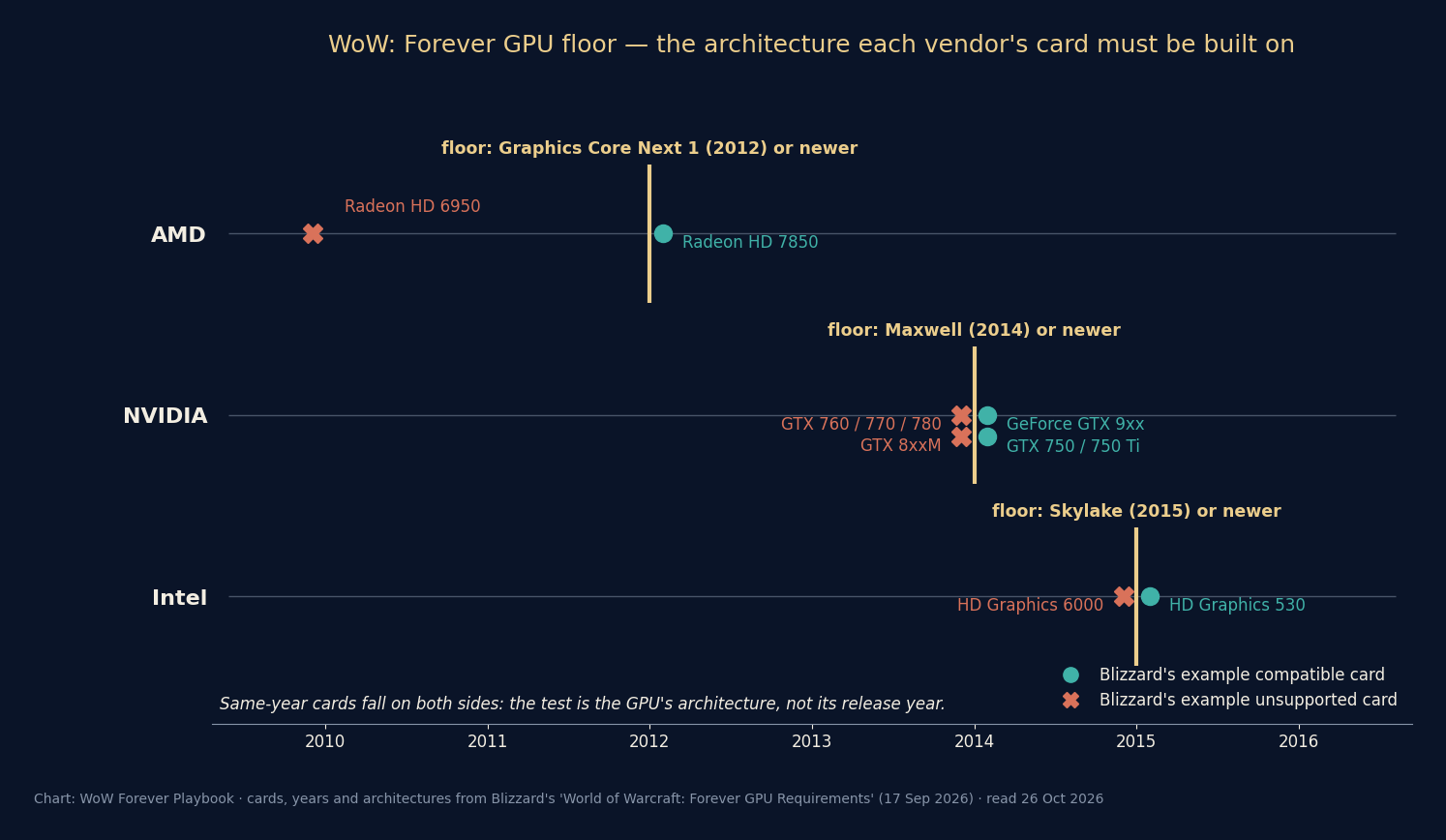
Blizzard's wording is: 'Players will be required to use a GPU based on one of the following microarchitectures or newer', followed by three lines — 'AMD Graphics Core Next 1 (2012)', 'NVIDIA Maxwell (2014)', 'Intel Skylake (2015)'. The years are Blizzard's own. The post then gives example cards for each vendor, which the table lines up against the floor.
Read the table across rather than down. Each row is one vendor's line in the sand: the architecture named, one or two products Blizzard says clear it, and one or two it says do not. Nothing outside the bracketed names is added here. Blizzard calls them examples — 'As a general reference' — so a card missing from both columns is not automatically ruled in or out; it is decided by the architecture it is built on, which the next section shows how to find.
| Vendor | Minimum microarchitecture | Example compatible cards | Example unsupported cards |
|---|---|---|---|
| AMD | Graphics Core Next 1 (2012) | Radeon HD 7850 (2012) | Radeon HD 6950 (2010) |
| NVIDIA | Maxwell (2014) | GeForce GTX 9xx; GTX 750 / 750 Ti (2014) | GTX 760 / 770 / 780; GTX 8xxM (2014) |
| Intel | Skylake (2015) | HD Graphics 530 (2015) | HD Graphics 6000 (2015) |
Why a card's year does not settle it
The chart shows the part of Blizzard's list that trips people up. On the NVIDIA line, the GTX 750 and 750 Ti are listed as compatible and the GTX 760, 770 and 780 as unsupported, and Blizzard dates both groups 2014. A bigger model number does not mean a newer design: by Blizzard's own list, the 750-class cards make the cut and the higher-numbered cards do not. Intel's line has the same split: HD Graphics 530 is compatible and HD Graphics 6000 is not, and both are dated 2015.
Blizzard puts it plainly: 'In general, this requirement means that your graphics card needs to be from a newer generation.' The test is the generation, meaning the microarchitecture, and not the shelf date or the model number. That is why a lookup by name beats a guess by age. If your exact card is one of Blizzard's examples, you have your answer. If it is not, find which microarchitecture it uses, ideally on the manufacturer's own product page, and compare that against the three names in the table. Anything built on the named architecture or a later one qualifies, by the 'or newer' in Blizzard's sentence.
Two details deserve a second look. Blizzard lists the GTX 9xx family as compatible and the whole GTX 8xxM family, the laptop parts, as unsupported, so laptop owners should not read the 800-series mobile chips as 'between' the two. And AMD's line is the oldest of the three: the floor there is a 2012 architecture, with the Radeon HD 6950 from 2010 as the unsupported example. This page reports these values as Blizzard lists them and does not adjust any of them.
How to check which graphics card you have
Blizzard gives two ways to find your GPU on Windows, and both take under a minute. Its wording is quoted in the steps below. Either one shows the make and model, such as 'NVIDIA GeForce GTX 970' or 'Intel HD Graphics 530', which is the name you then compare against the table.
What you do with the name depends on where it lands. If it matches a compatible example, or is plainly from a later generation from the same maker, you are above the floor and the next thing to check is the Shop's full minimum specification. If it matches an unsupported example, Blizzard's answer is direct: 'If your system uses an older card, you'll need to upgrade your GPU before playing World of Warcraft: Forever.' If it matches neither, look up its microarchitecture as described above.
Blizzard's post does not cover computers with more than one graphics adapter, such as a laptop with integrated and dedicated graphics. Both entries will appear under Display adapters. The post does not say which one the game checks, so this page does not guess.
- Settings route: 'Open Settings, select System, then Display, and choose Advanced display to view your GPU's make and model.'
- Device Manager route: 'Open Device Manager and expand Display adapters to see the graphics hardware installed on your system.'
- Write down the exact model name and compare it with Blizzard's example cards in the table above.
- If it is not listed, find its microarchitecture and compare that with AMD Graphics Core Next 1, NVIDIA Maxwell or Intel Skylake.
- Whatever the result, update your graphics drivers. Blizzard's install steps begin with 'Make sure your graphics drivers are up to date.'
The reason: RGBA16F UAV support and Forever's new look
Blizzard ties the cut-off to the graphics update rather than to performance: 'World of Warcraft: Forever introduces a new visual look to the game. To support that visual update, we rely on a feature introduced to GPUs around 2012: RGBA16F UAV support in compute shaders.' It adds that the change 'helps support the updated visual look of World of Warcraft: Forever and provides a more consistent experience for players.'
Blizzard does not explain the terms. In general graphics-programming usage, a compute shader is a GPU program that runs outside the normal drawing pipeline. A UAV, an unordered access view in Direct3D's naming, lets such a program write to a texture or buffer as well as read it. RGBA16F is a pixel format with four channels (red, green, blue, alpha), each a 16-bit floating-point number. Blizzard says the feature was introduced to GPUs around 2012, and its unsupported examples show that some later cards lack it too (the GTX 760/770/780 and GTX 8xxM from 2014, the Intel HD Graphics 6000 from 2015). Our reading is that a renderer built on it cannot run on those cards, and that no settings change works around a missing hardware feature; Blizzard does not say that in so many words. That fits Blizzard's phrasing: these cards 'will no longer be supported', not that they will run slowly.
What the new look contains is covered on the graphics page: the modern and Classic visual presets, HD and SD character models, and the rendering touches Blizzard named, including 'rivers that flow through Elwynn Forest, mist over the waters of Darkshore, and moonlight breaking through the trees in Ashenvale'. Blizzard has not said which of these effects needs the RGBA16F feature, or whether the Classic preset still requires it. The post's sentence about players being 'required' to use a qualifying GPU makes no exception for either preset.

To support that visual update, we rely on a feature introduced to GPUs around 2012: RGBA16F UAV support in compute shaders.
— Blizzard, 'World of Warcraft: Forever GPU Requirements', 17 September 2026
CPU, memory, storage and the rest: what the Shop holds
The post ends with 'You can view the full minimum system requirements on the Battle.net Shop.' That is the only place Blizzard points to for the processor, memory, storage and operating-system lines, and this page does not reproduce them. When this site read Blizzard's pages in September, the Battle.net support article on World of Warcraft requirements asked us to log in, an older requirements URL returned a 404, and the Forever product page and Shop page we read gave no specification table. The Subscription page links to 'World of Warcraft® Classic System Requirements', which describes WoW Classic, a different game client. Quoting another client's figures as Forever's would be guessing, so this page leaves them out.
Blizzard's pages do state a few general requirements outright. The product page footer reads: 'Internet connection, Battle.net® Account, and Battle.net® desktop app required to play.' The game installs through that app; the download guide covers each step. For operating systems, Wikipedia's article on the game lists Windows and macOS, and Blizzard has announced no console, mobile or Linux client. Access is a separate question from hardware: on the Shop page, 'A subscription or game time is required to play World of Warcraft®: Forever.'
If you want the official CPU and RAM lines before launch, open the Battle.net Shop's Forever page in a browser on the day you check. The figures are drawn by scripts in the page, so they may not show in a plain text copy. Keep the floor above in mind as you read them. Clearing the GPU floor gets your card supported; meeting the Shop's minimum is what makes it run as Blizzard intends.
| Requirement | Status | Where it comes from |
|---|---|---|
| GPU microarchitecture floor | Published: AMD GCN 1 / NVIDIA Maxwell / Intel Skylake or newer | GPU Requirements post (S37) |
| Graphics feature | Published: RGBA16F UAV support in compute shaders | S37 |
| CPU, memory, storage, OS versions | Not quoted here; Blizzard points to the Battle.net Shop | S37 |
| Internet, Battle.net account, Battle.net app | Published: 'required to play' | Product page footer (S6), read 16 Sep 2026 |
| Platforms | Windows and macOS | Wikipedia (S9), read 16 Sep 2026 |
| Subscription or Game Time | Published: required to play | Battle.net Shop (S7), read 17 Sep 2026 |
| Download or install size | Not published | - |
Macs and the GPU rule
The GPU post is written for Windows. Both of its check-your-card methods are Windows menus, and its three architecture names come from AMD, NVIDIA and Intel. It says nothing about Macs, including Macs that use Apple's own graphics, which none of those three names covers. Forever is listed for macOS, so Mac players are not shut out. But Blizzard has not published a Mac version of the floor, and this site will not invent one.
On an Intel-based Mac with AMD or Intel graphics, the same architecture test applies on its face. The graphics chip appears under About This Mac, and you can compare it with the table the same way. On a Mac with Apple silicon, the honest answer is that Blizzard has not addressed it in the GPU post. The Shop's requirements listing is where a macOS line would appear. Until then, install the client through the Battle.net app and see whether it launches. Name reservation from 27 October gives pack owners a chance to do that before launch day.
If your card is below the line
Blizzard offers one remedy and repeats it twice: 'you'll need to upgrade your GPU before playing', and 'Players using a GPU based on older microarchitectures will need to upgrade their hardware before playing World of Warcraft: Forever.' Blizzard mentions no lower-detail fallback for older cards. Our reading is that changing in-game settings will not help, because the missing piece is a hardware feature rather than a speed limit.
Blizzard also says 'The vast majority of World of Warcraft players are already using compatible hardware', so most readers will find their card is fine. If yours is not, the dates matter. The game launches on 4 November 2026 at 3:00 p.m. Pacific, and Early Name Reservation for pack buyers runs from 27 October to 3 November. Blizzard has not said what happens if you start the game on an unsupported card, whether it shows a warning, refuses to start or fails some other way. So the safe course is to check now, not on launch night. When you buy a replacement, check it against the Shop's full minimum, not only the floor, since Blizzard warns that even its compatible examples fall 'well below' that minimum.
Questions people ask
- What are the WoW Forever system requirements for graphics?
- A GPU built on AMD Graphics Core Next 1 (2012), NVIDIA Maxwell (2014), Intel Skylake (2015) or a newer microarchitecture, with RGBA16F UAV support in compute shaders. Older GPUs are not supported.
- Will a GTX 970 or GTX 750 Ti run WoW Forever?
- Both clear the floor: Blizzard lists the GTX 9xx family and the GTX 750/750 Ti as compatible examples. It also says those examples are 'still well below the minimum requirements for the game', so check the Shop's full minimum for performance.
- Is the GTX 760, 770 or 780 supported?
- No. Blizzard lists the GTX 760/770/780 and the GTX 8xxM laptop chips as example unsupported cards.
- What CPU and how much RAM does WoW Forever need?
- Blizzard's GPU post does not say; it directs players to 'the full minimum system requirements on the Battle.net Shop'. This site does not substitute retail or Classic figures.
- Does WoW Forever run on Mac?
- Forever is listed for Windows and macOS. Blizzard's GPU post covers only Windows checks and AMD, NVIDIA and Intel architectures; it has not published Mac-specific GPU guidance.
Sources & further reading
- Blizzard — 'World of Warcraft: Forever GPU Requirements' (AMD GCN 1, NVIDIA Maxwell, Intel Skylake or newer; RGBA16F UAV support), 17 Sep 2026, read 26 Oct 2026
- Battle.net Shop — World of Warcraft: Forever editions and footnotes (script-rendered; read in a browser 17 Sep 2026)
- Blizzard — official World of Warcraft: Forever page, read 16 Sep 2026
- Wikipedia — World of Warcraft: Forever (platforms, announcement date), read 16 Sep 2026
- Blizzard — World of Warcraft: Forever What's Next panel recap (zones, dungeons, raids, battleground, roadmap), read 16 Sep 2026
- Blizzard — 'Claim Your World of Warcraft: Forever Character Names' (Early Name Reservation 27 Oct–3 Nov, regional start times, 3 characters, install steps), 20 Oct 2026, read 26 Oct 2026
- Blizzard — 'Carve a New Path with World of Warcraft: Forever' (launch date, beta date, edition contents), read 16 Sep 2026
Read next
- WoW Forever graphics
WoW Forever graphics: modern and Classic presets, HD and SD models, revised HD Skyborne Druid forms, SD Skyborne due early 2027, lighting upgrades — sourced.
- How to Download WoW Forever
How to download WoW Forever: open the Battle.net app, pick World of Warcraft, choose Forever in the Game Version menu, click Install. Dates, access, fixes.
- WoW Forever release date
WoW Forever release date is 4 November 2026 at 3:00 p.m. Pacific, globally. Countdown, every time zone, beta 17 Sep–21 Oct and every dated milestone.
- WoW Forever price
WoW Forever price: included with a subscription; Skyborne Heroic Pack $29.99, Epic Pack $59.99, Warcraft Forever Collection $79.99. What each adds, dated.
- Is WoW Forever free?
Is WoW Forever free? It is included with any World of Warcraft subscription or Game Time; only the Skyborne race needs a pack ($29.99+). No trial announced.
Part of WoW Forever release date. Back to the WoW Forever Playbook home page.

Sukie · Editor
Sukie runs WoW Forever Playbook. She reads every Blizzard article, panel recap and forum post about World of Warcraft: Forever, checks each number against the source before it goes on a page, and rewrites anything a later Blizzard post contradicts. The focus is narrow on purpose: what Blizzard has actually said, with the source attached.
About this site · How pages are checked · Last updated October 29, 2026
WoW Forever Playbook is an unofficial fan site. It is not affiliated with, endorsed by or associated with Blizzard Entertainment. Game names, images and trademarks belong to their owners.