
Guide
How to download WoW Forever: install it from the Battle.net app's Game Version menu, then log in from 4 November with a subscription or Game Time
Here is how to download WoW Forever. Open the Battle.net desktop app, select World of Warcraft, choose 'World of Warcraft: Forever' in the Game Version menu above the Play button, and click Install. Forever is not a separate game in the app. It is a version of World of Warcraft, and playing it from launch on 4 November needs an active subscription or Game Time.
The steps come from Blizzard's own launch instructions, published with Early Name Reservation on 20 October 2026. Earlier posts used the same menu for the beta and the stress test, both now over. This page walks through the install, then the three questions people ask next: when they can actually log in, what their account needs, and what to do if something goes wrong.
Two things to do first take a minute each. Update your graphics drivers, which is step one in every one of Blizzard's install guides. Then check that your graphics card clears Forever's GPU floor, because an older card is unsupported however the download goes.
The install, step by step
Blizzard's 'Prepare to Launch' list in the name-reservation post is the current, official set of steps. The list below follows it in order, with Blizzard's wording in quotes and a note where a step has a catch.
The step people miss is the Game Version menu. Blizzard's steps put Forever in 'the Game Version menu above the Play button'. That is how the Battle.net app generally works: it lists World of Warcraft once, with modern WoW, Classic and Forever as versions inside that entry, and Play starts whichever version the menu currently shows. So check that it reads Forever before clicking. For the beta and the stress test the Forever entries appeared 'under In Development'. Blizzard's launch steps name 'World of Warcraft: Forever' with no such label.
Blizzard has not published the download size or an install time, and its steps give no figure to plan around. In general the Battle.net app reports a size and progress once an install starts, but Blizzard has not said what Forever's will be.
- 'Make sure your graphics drivers are up to date.'
- 'Download and install the Battle.net desktop app' (from Battle.net, if it is not already on your computer).
- 'Open the Battle.net desktop app and allow it to update if needed.' The beta post adds that it 'may need to update itself if you haven't run it recently'.
- 'Select World of Warcraft from the list of games.'
- 'In the Game Version menu above the Play button, select World of Warcraft: Forever, then select Install.'
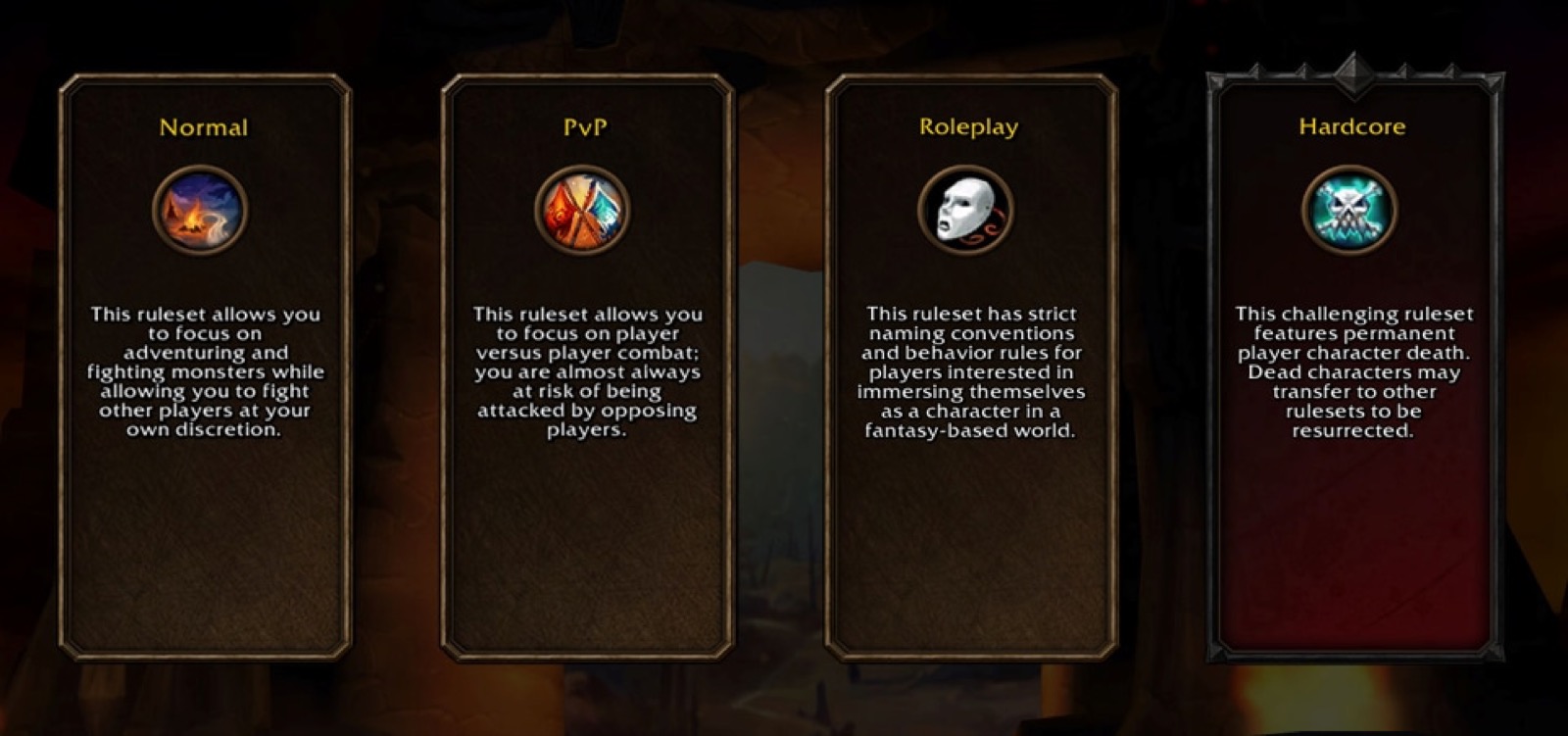
- 'Once installation is complete select Play and choose your Ruleset.'
- Create your character. During Early Name Reservation, Blizzard's step reads 'Create up to 3 characters with your chosen name.'
When you can install, and when you can play
The download and the first login happen on different dates for different players, and Blizzard has dated each step. The launch itself is global: Blizzard's announcement says Forever 'launches November 4 at 3:00 p.m.' Pacific, and the What's Next recap repeats the date. The release-date page converts that into local times for every major zone.
Before launch, Blizzard's instructions only cover one group installing the live client: pack owners using Early Name Reservation from 27 October. The reservation start times Blizzard lists are 27 October at 1:00 p.m. PDT in North America and 18:00 CET in Europe, and 28 October at 07:00 in Korea (KST) and Taiwan (CST). Blizzard has not announced a separate pre-load date for everyone else, or said whether players without a pack can install the client before 4 November. If the Forever option is in your Game Version menu early, installing then saves downloading in the launch-night rush. If it is not, it will be there at launch.
Invited friends follow the pack timetable. The Invite-A-Friend Launch Code in each pack 'grants an eligible invitee access to WoW: Forever from November 4-11', according to the product page footnotes. Blizzard said codes 'will be provided by email beginning October 20', and gift purchases are excluded.
| Date | Who | What you can do |
|---|---|---|
| 27 Oct – 3 Nov 2026 | Owners of the Skyborne Heroic Pack, Skyborne Epic Pack or Warcraft Forever Collection | Install, log in, reserve names for up to 3 characters across all rulesets |
| 4 Nov 2026, 3:00 p.m. Pacific | Anyone with an active subscription or Game Time | Play: 'Your WoW subscription or game time grants you access to WoW: Forever starting November 4' |
| 4 Nov 2026 | Epic Pack and Collection owners | 30 days of Game Time added to the account at launch |
| 4 – 11 Nov 2026 | Friends with an Invite-A-Friend Launch Code | Play Forever for the code's window |
| 9 Dec 2026 | Everyone | Raids unlock (no new download step announced) |
What your account needs to log in
The download is the easy part. Access is what decides whether Play works. Blizzard's Shop page is explicit: 'A subscription or game time is required to play World of Warcraft®: Forever. Access to World of Warcraft®: Forever is included with your active World of Warcraft subscription or game time.' The October subscription-offer post says it more simply: 'Your WoW subscription or game time grants you access to WoW: Forever starting November 4.' The same post describes a single subscription that grants access to modern World of Warcraft, Forever and WoW Classic progression.
The paid packs add things on top of that access rather than replacing it. The Skyborne Heroic Pack and up add the Skyborne race and the Zephras Isle starting questline ('Access to Skyborne Race or the Zephras Isle starting experience questline requires purchase of Skyborne Heroic Pack or higher edition'). They also add Early Name Reservation and Invite-A-Friend codes. The Epic Pack and the Collection include 30 days of Game Time from launch, after which 'gameplay outside the included 30-day period requires a Subscription or additional Game Time'. The price page sets out each edition.
The product page footer lists the remaining requirements: 'Internet connection, Battle.net® Account, and Battle.net® desktop app required to play.' Forever is listed for Windows and macOS. Blizzard has announced no console, mobile or Linux version, so there is nothing else to download from anywhere.
Your first login: ruleset, language, names
The first screen after Play is not a realm list. Forever is realmless, and Blizzard's final install step reads 'select Play and choose your Ruleset'. At launch the choices are Normal, PvP, Roleplaying and, following Blizzard's 22 October update, Roleplay-PvP. Blizzard planned to make Roleplay-PvP available for Early Name Reservation as well. Hardcore 'will be available sometime after launch', even though it appears on the selection screen in Blizzard's preview image.
The choice sticks more than a realm pick used to. 'Players cannot freely hop between rulesets; to play under a different one, they'll need to create a new character in that ruleset.' Grouping, dungeons and raids work only within a ruleset ('Cross-ruleset grouping is not supported'), although battlegrounds can mix rulesets except Hardcore. On the PvP ruleset an account can only make characters for one faction. During Early Name Reservation the three-character limit is shared across all rulesets, so two PvP characters leave room for one elsewhere.
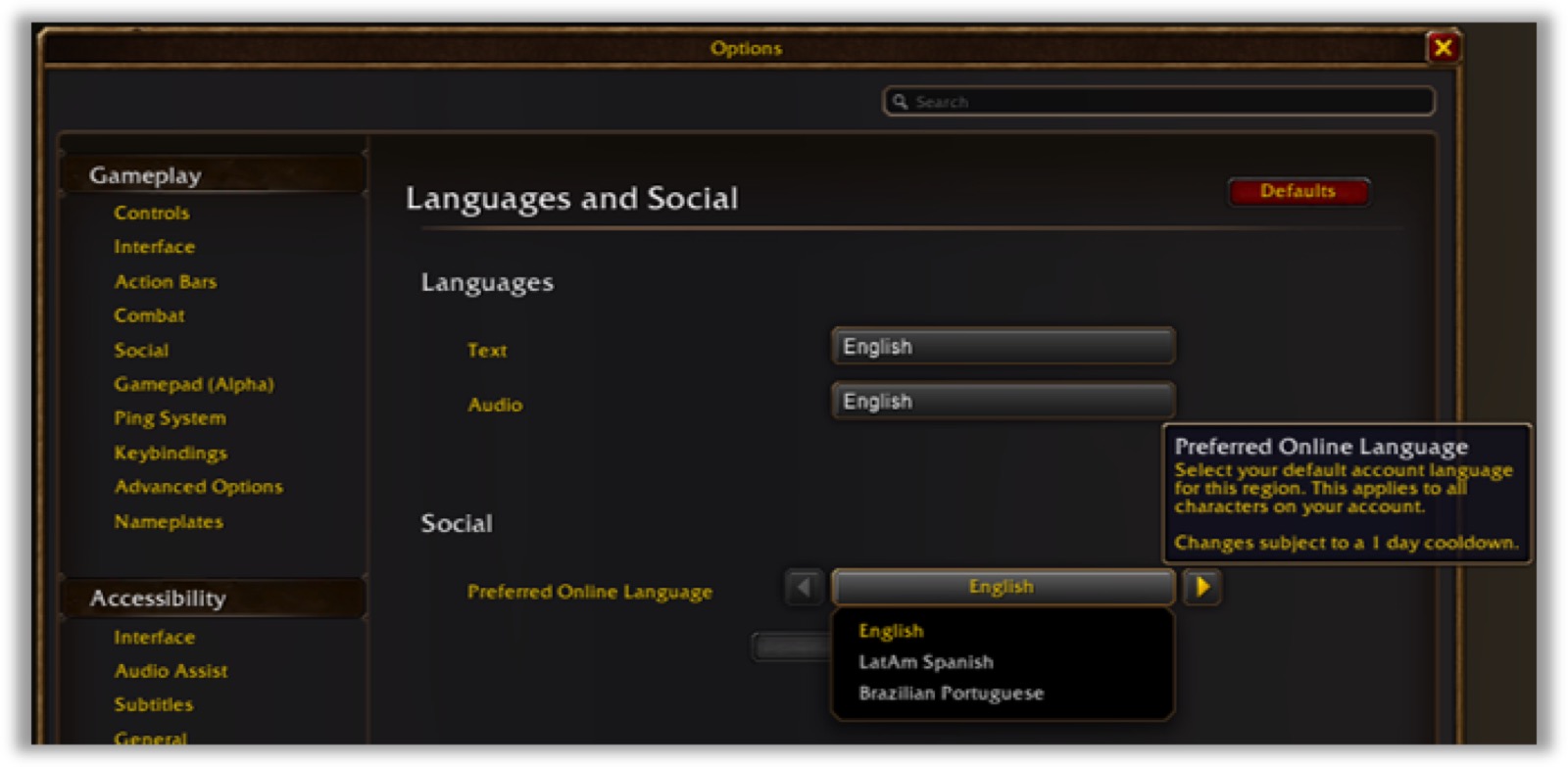
Set your language once you are in. Blizzard's path is: open the Game Menu with Escape, choose Options, then Languages and Social under System, and pick a 'Preferred Online Language'. It is 'account-wide', applies to all characters and 'has a 24-hour cooldown before it can be changed again'. It is how the realmless world pairs you with players who share your language.
When the download or the login goes wrong
Blizzard's Forever posts give a short list of fixes, and this section sticks to them. The rest is general Battle.net support territory. The beta post points players who 'have issues installing or operating the test' to Blizzard's Common Technical Issues and Solutions article, which is also the right first stop for the live client.
Unsupported hardware is the one failure no reinstall fixes. If your GPU predates AMD Graphics Core Next 1, NVIDIA Maxwell or Intel Skylake, Blizzard says you 'will need to upgrade' it before playing. The system-requirements page explains how to check.
- Forever missing from the Game Version menu: let the Battle.net app update and restart it. For newly granted beta access Blizzard warned of 'minimal delays of up to 30 minutes' and that 'a launcher restart may be needed'.
- The game fails to start or looks wrong: update your graphics drivers first; it is the first step of every Blizzard install list for Forever.
- Play launches the wrong game: check that the Game Version drop-down above the Play button shows World of Warcraft: Forever.
- Your card is older than the GPU floor: upgrade the GPU; nothing in the download process works around it.
- Anything else: Blizzard's Common Technical Issues and Solutions article, then Blizzard Support.
The beta and stress-test entries you may still see
If you took part in testing, your Game Version menu may still show older Forever entries. The beta was installed by choosing 'the World of Warcraft: Forever Beta option listed under In Development', with test realms and test characters. The stress test was 'World of Warcraft: Forever Stress Test under In Development'. Both were temporary. The beta was 'available through October 21, the last full day of testing', and Blizzard said stress-test characters, names and guilds would be wiped 'in preparation for the beginning of Name Reservations opening on October 27.'
Blizzard says the stress test's characters, names and guilds were wiped before reservation opened. For the beta it published no carry-over; its characters were made on test realms, so our reading is that they do not carry into the live game either. The live client is the plain 'World of Warcraft: Forever' entry from Blizzard's launch steps. Blizzard has not said whether it removes the leftover test entries from the menu, or whether you need to uninstall them yourself to free the disk space; the app's per-version options are where to look.
Questions people ask
- How do I download WoW Forever?
- Install and open the Battle.net desktop app, select World of Warcraft, choose 'World of Warcraft: Forever' in the Game Version menu above the Play button and click Install. When it finishes, click Play and choose your ruleset.
- Is WoW Forever a separate download from World of Warcraft?
- It is a separate version, installed from the same World of Warcraft entry in the Battle.net app. You switch to it with the Game Version menu.
- Can I download WoW Forever for free?
- The Battle.net app is free, but playing needs an active World of Warcraft subscription or Game Time from 4 November. The one-day free stress test ended on 21 October.
- When can I download WoW Forever?
- Pack owners install it for Early Name Reservation from 27 October; Blizzard has not announced a pre-load date for other players. Everyone with a subscription or Game Time can play from 4 November at 3:00 p.m. Pacific.
- How big is the WoW Forever download?
- Blizzard has not published a download or install size. In general the Battle.net app reports the size once an install starts.
- Can I download WoW Forever on Mac, console or phone?
- Forever is listed for Windows and macOS through the Battle.net app. Blizzard has announced no console, mobile or Linux version.
- Do my beta characters carry over?
- Stress-test characters, names and guilds were wiped before name reservation, Blizzard says. The beta used test realms and test characters; Blizzard published no carry-over for them, so our reading is no.
- Why does Play open modern WoW instead of Forever?
- In general the Battle.net app's Play button starts whichever version the Game Version menu shows. Select World of Warcraft: Forever in that drop-down above the Play button before clicking Play.
Sources & further reading
- Blizzard — 'Claim Your World of Warcraft: Forever Character Names' (Early Name Reservation 27 Oct–3 Nov, regional start times, 3 characters, install steps), 20 Oct 2026, read 26 Oct 2026
- Blizzard — 'The World of Warcraft: Forever Beta Now Live' (beta install steps, level cap 20 then 30, beta through 21 Oct), 17 Sep 2026, read 26 Oct 2026
- Blizzard — '[Updated Oct 16] Join the World of Warcraft: Forever Stress Test' (21 Oct, open to all, characters wiped), 15 Oct 2026, read 26 Oct 2026
- Blizzard — 'World of Warcraft: Forever GPU Requirements' (AMD GCN 1, NVIDIA Maxwell, Intel Skylake or newer; RGBA16F UAV support), 17 Sep 2026, read 26 Oct 2026
- Blizzard — 'Carve a New Path with World of Warcraft: Forever' (launch date, beta date, edition contents), read 16 Sep 2026
- Blizzard — World of Warcraft: Forever What's Next panel recap (zones, dungeons, raids, battleground, roadmap), read 16 Sep 2026
- Blizzard — 'Unlock a Year of World of Warcraft and Get Bonus Treasures' (6/12-month offer; Forever-only Tabard of Eternal Exploration, Eternal Explorer's Backpack, Azurky pet), 15 Oct 2026, read 26 Oct 2026
- Blizzard — official World of Warcraft: Forever page, read 16 Sep 2026
- Battle.net Shop — World of Warcraft: Forever editions and footnotes (script-rendered; read in a browser 17 Sep 2026)
- Blizzard — '[Updated 10/22] Choose Your Ruleset in World of Warcraft: Forever' (Normal/PvP/Roleplaying/Hardcore, Roleplay-PvP at launch, no cross-ruleset grouping, one faction per account on PvP, language preference), 22 Oct 2026, read 26 Oct 2026
- Wikipedia — World of Warcraft: Forever (platforms, announcement date), read 16 Sep 2026
Read next
- WoW Forever System Requirements
WoW Forever system requirements: your GPU must be AMD GCN 1, NVIDIA Maxwell, Intel Skylake or newer. Example cards, how to check yours, and what else applies.
- WoW Forever release date
WoW Forever release date is 4 November 2026 at 3:00 p.m. Pacific, globally. Countdown, every time zone, beta 17 Sep–21 Oct and every dated milestone.
- WoW Forever price
WoW Forever price: included with a subscription; Skyborne Heroic Pack $29.99, Epic Pack $59.99, Warcraft Forever Collection $79.99. What each adds, dated.
- Is WoW Forever free?
Is WoW Forever free? It is included with any World of Warcraft subscription or Game Time; only the Skyborne race needs a pack ($29.99+). No trial announced.
- WoW Forever realmless rulesets
WoW Forever realmless explained: Normal, PvP, Roleplaying, Roleplay-PvP and Hardcore rulesets replace realms; two-part names unique per region.
- WoW Forever beta
WoW Forever beta runs 17 September – 21 October 2026. Guaranteed access needs the $59.99 Epic Pack or $79.99 Collection; Beta Opt-In is a chance, not a key.
Part of WoW Forever release date. Back to the WoW Forever Playbook home page.

Sukie · Editor
Sukie runs WoW Forever Playbook. She reads every Blizzard article, panel recap and forum post about World of Warcraft: Forever, checks each number against the source before it goes on a page, and rewrites anything a later Blizzard post contradicts. The focus is narrow on purpose: what Blizzard has actually said, with the source attached.
About this site · How pages are checked · Last updated October 31, 2026
WoW Forever Playbook is an unofficial fan site. It is not affiliated with, endorsed by or associated with Blizzard Entertainment. Game names, images and trademarks belong to their owners.