
Guide
WoW Forever Discord: account linking, guild chat mirroring and the official WoW Portal Room are three different things
WoW Forever Discord can mean three separate things, and each has a different answer: linking your own account to Discord, mirroring your guild's chat to a Discord channel, or joining the official WoW Portal Room server. Account linking is a setting under Options. Guild mirroring needs a Discord administrator and an in-game guild leader or officer. The Portal Room is simply a server you join.
Blizzard documented the first two in 'Stay Connected in World of Warcraft with Discord' on 4 November 2026, the day Forever launched, and the third in a 27 October post. Find your row in the table, then go straight to that section.
Which of the three do you need?
The features overlap in name only. Nothing in Blizzard's steps ties the Portal Room to a linked account, or account linking to a guild. Guild mirroring is the one that depends on another step, because the person setting it up is choosing from Discord servers they belong to, so the guild leader or officer doing it will need a linked account first. Blizzard does not spell that order out as a rule, but the steps only make sense that way round.
All of this applies to both modern World of Warcraft and Forever. Blizzard's article covers them together and shows a screenshot of each version beside the relevant steps. The menu paths below are the ones it gives for both.
| What you want | What it is | Who does it | Where |
|---|---|---|---|
| Connect my account | Links Discord to your Battle.net account | Each player | Game Menu, Options, Social Tab |
| Bring guild chat into Discord | Sends messages both ways between guild chat and one chosen channel | Discord administrator, then guild leader or officer | Discord channel permissions, then the in-game Guild panel |
| Find an official server | The WoW Portal Room, the official World of Warcraft Discord server | Anyone | Blizzard's invite link in its 27 October post |
Link your account to Discord
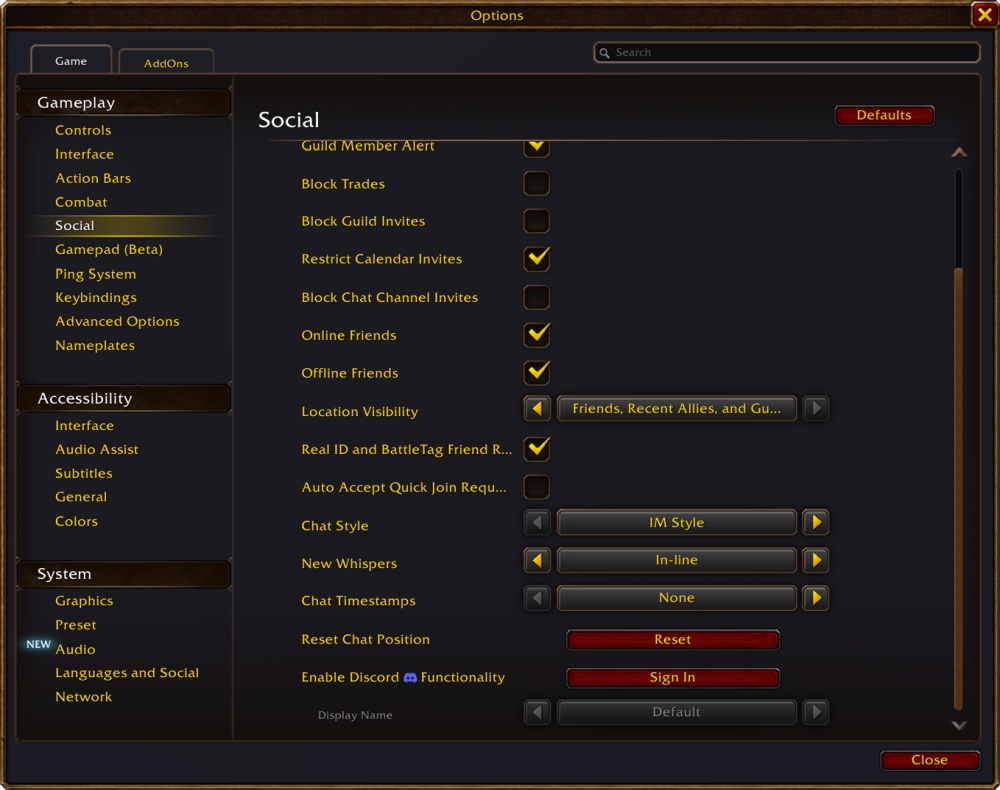
Linking joins your Discord account to your Battle.net account, not to a single character. Log in to Discord first: Blizzard's one warning is 'Make sure you're logged into Discord before attempting to connect your accounts, it will ask you to confirm the connection as well.'
Blizzard does not list what the link shares beyond its use in chat, so read the confirmation screens before you accept them. Blizzard's article also gives no instructions for undoing a link, and it does not say how to remove the connection. Check the Social Tab first if you later want out.
- Log in to Discord.
- In the game, press Escape to open the Game Menu.
- Open Options and go to the Social Tab.
- Find Enable Discord Functionality and select Sign In, the button Blizzard's screenshot shows beside it.
- Follow the additional screens to finalise the connection, and confirm it when Discord asks.
Connect guild chat to a Discord channel
Two people may be involved, and the order matters. The first job is on the Discord side. 'Administrators of a guild Discord will first need to make sure they enable the appropriate channel permissions in order to connect their guild chat to their chosen Discord chat channel.' There are three, and the table gives Blizzard's own definition of each. Blizzard does not say which role or account has to hold them, so if you are the administrator, check the channel's permissions for the person doing the linking.
The second job happens in the game: 'The rest of your connection can be performed within World of Warcraft by either the guild leader or officers with the correct permissions.' Blizzard does not name the officer permission, so if an officer cannot reach the settings, have the guild leader do it. The window then shows 'all Discord servers you belong to' and 'the specific channels that have linking permissions available', which means a channel without those permissions will not be offered.
Blizzard labels the finished state 'Discord Successfully Linked'. Blizzard adds an option at this stage: 'You can also create a separate Discord chat into its own channel within World of Warcraft.' That is the same choice the guild leader can revisit later, covered in the next section.
Remember that a Forever guild is tied to its Ruleset and faction, since characters can only join guilds within those limits. If your community plays on two Rulesets or both factions it will have more than one guild. Blizzard has not said whether several guilds can share one Discord channel, or whether a modern WoW guild and a Forever guild can. Give each guild its own channel unless you have tested otherwise.
- Open the Guild & Communities panel with the J hotkey.
- Select the Roster tab on the right side of the panel.
- Select 'Guild Settings' at the bottom right of the panel.
- Under the Guild Control dropdown, select Discord Settings.
- Click a server to select it.
- Select a linkable channel from the dropdown and click the link.
| Permission | Blizzard's definition | Set by |
|---|---|---|
| Manage Channels | 'Ability to edit channel settings' | The Discord administrator, on the chosen channel |
| View Channel | 'Can see and read the channel' | The Discord administrator, on the chosen channel |
| Send Messages | 'Can post messages in the channel' | The Discord administrator, on the chosen channel |
What guild chat looks like once it is connected
Messages run both ways, and you can tell where each came from: 'You'll easily be able to identify when a message has been sent from Discord or sent from within the game'. Blizzard also says you can adjust your chat tabs so that you can follow the guild whether you are in the game or not.
Three choices shape what people see. The first belongs to each player and is the Display Name dropdown, which sets 'the character name you want to display when chat messages arrive from Discord'. The options are Default ('Use game-defined default, currently Last Online Character'), Last Online Character Name ('Use the last online character for your Battle.net account in this guild') and Discord Global Name ('Use your Global Name from Discord'). The difference is practical in a guild with alts. A character-based name changes with whatever you last played in that guild, while the Discord name stays the same.
The second belongs to the guild leader. 'Guild leaders will have the option to modify settings at any time in the guild Discord settings to filter chat so that Discord traffic goes to a regular /guild chat channel or into a new dedicated guild /discord channel.' In a quiet guild, regular /guild keeps everything in one stream. In a busy one, the dedicated /discord channel lets members separate Discord traffic from in-game talk, and it pairs well with a chat tab of its own.
The third is whether a player has linked at all. Blizzard's sentence is 'If a player hasn't linked their account to Discord, it will not show in-game messages in the Discord chat and will display as follows:', followed by a screenshot. The wording leaves some doubt about exactly what the unlinked player sees or sends, so the safe reading for a guild leader is simple: ask members who want to take part to link their accounts first.
| What you see | What Blizzard's article points to |
|---|---|
| No Enable Discord Functionality option | Look in Options under the Social Tab, not in the chat or guild panels. |
| The account link will not confirm | Log in to Discord first, then try again from the game. |
| Your server is missing from Discord Settings | The window lists Discord servers you belong to. Check that the linked account is a member. |
| The server appears but the channel does not | Only channels with linking permissions are shown. Ask the administrator to check Manage Channels, View Channel and Send Messages. |
| An officer cannot reach Discord Settings | Only the guild leader and officers 'with the correct permissions' can do this. Ask the guild leader. |
| Discord traffic is swamping guild chat | The guild leader can move it to a dedicated /discord channel at any time. |
| Clicking the link does nothing | Not covered by Blizzard's article. Guild leaders have posted bug reports about this on the official forums, so check the bug report section there. |
The WoW Portal Room: the official server, and what it is for
Blizzard's answer to 'is there an official Discord' is one sentence: 'The WoW Portal Room is the official World of Warcraft Discord server, bringing players and community Ambassadors together in an inclusive hub.' It is a World of Warcraft server and not a Forever-only one, though Blizzard's 27 October post says it 'is ready to welcome World of Warcraft: Forever players'. The invite in Blizzard's post is discord.gg/hcFyh4AGkk. Invites can change, so if it fails, use the link in Blizzard's post, listed under Sources below.
It helps to know what the server is built to do, because it is not meant to be where you settle. 'Like any portal, it is a gateway—not the final destination.' The people to look for are the WoW Ambassadors, whom Blizzard describes as 'experienced players who represent their Discord communities in the WoW Portal Room'. Their job is to point you to communities that suit you, whether that means playing together, swapping stories or learning. So if you want a guild or a regular group, say what you are looking for and ask an Ambassador where to go next.
Other servers with 'WoW Forever' in their names turn up in any search. Blizzard's post names the Portal Room and no other, so treat the rest as community-run unless they show otherwise. Being listed on Discord's own server directory does not make a server official. Blizzard's posts also do not name a separate Forever-only official server, and this page does not list community invites, because it cannot vouch for who runs them.
One more server sometimes comes up. Blizzard's statement on addon changes for Forever was made in the WoW UI Discord, as reported by Wowhead on 16 September 2026. That is a place for addon authors and has nothing to do with account linking or guild chat.
Questions people ask
- Is there an official WoW Forever Discord?
- The official server Blizzard names is the WoW Portal Room, which is the World of Warcraft Discord server and welcomes Forever players. Blizzard's posts do not name a separate Forever-only one.
- How do I link Discord to WoW Forever?
- Log in to Discord, then in the game open the Game Menu with Escape, go to Options, the Social Tab, and choose Enable Discord Functionality. Follow the screens and confirm.
- Who can connect guild chat to Discord?
- A Discord administrator enables Manage Channels, View Channel and Send Messages, then the guild leader or officers with the correct permissions finish the link in the game.
Sources & further reading
- Blizzard — 'Stay Connected in World of Warcraft with Discord' (account linking and guild chat mirroring in modern WoW and Forever), 4 Nov 2026, read 6 Nov 2026
- Blizzard — 'Your Next Adventure in WoW: Forever Starts in the WoW Portal Room' (official Discord server, Ambassadors), 27 Oct 2026, read 6 Nov 2026
- Blizzard — 'WoW: Forever—What's New and What Feels Familiar' (modern-WoW comparison, one subscription for both, Cooldown Manager and Damage Meter, 16 Legacy Points, one faction on PvP), 3 Nov 2026, read 6 Nov 2026
- Blizzard — official forums, WoW: Forever category, read 16 Sep 2026
- Wowhead — 'WoW: Forever Will Have Addon Changes from Midnight' (quotes Blizzard's statement in the WoW UI Discord), Squishei, 16 Sep 2026
Read next
- WoW Forever guide
WoW Forever guide for beginners: what to do first, step by step, the tools to open, and a page for every system, from camping and Legacy to rulesets.
- WoW Forever realmless rulesets
WoW Forever realmless explained: Normal, PvP, Roleplaying, Roleplay-PvP and Hardcore rulesets replace realms; two-part names unique per region.
- WoW Forever PvP ruleset
WoW Forever PvP ruleset rules: one faction per account, the 10 November faction lock (Horde on NA PvP), battlegrounds across rulesets, and Roleplay-PvP.
- WoW Forever Classic vs Enhanced
WoW Forever Classic vs Enhanced is a first-login preset, not a ruleset or skill level. Six settings compared, Blizzard's advice, and how to change it later.
- WoW Forever Controller Support
WoW Forever controller support works with all XInput controllers. The full button map, how to switch it on, the 84 action slots and what needs a keyboard.
- WoW Forever vs retail
WoW Forever vs retail (Modern WoW): level cap, flying, level scaling, realms, transmog, cost and timeline compared from Blizzard's own statements.
Part of WoW Forever guide. Back to the WoW Forever Playbook home page.

Sukie · Editor
Sukie runs WoW Forever Playbook. She reads every Blizzard article, panel recap and forum post about World of Warcraft: Forever, checks each number against the source before it goes on a page, and rewrites anything a later Blizzard post contradicts. The focus is narrow on purpose: what Blizzard has actually said, with the source attached.
About this site · How pages are checked · Last updated November 16, 2026
WoW Forever Playbook is an unofficial fan site. It is not affiliated with, endorsed by or associated with Blizzard Entertainment. Game names, images and trademarks belong to their owners.