
Guide
WoW Forever addons: where to install them on Windows and macOS, what Forever already has built in, and the addons players use, by job
WoW Forever addons go in the Forever client's own folder: C:\Program Files (x86)\World of Warcraft\_forever_\Interface\AddOns on a default Windows install, or /Applications/World of Warcraft/_forever_/Interface/AddOns on a Mac. Unzip each addon so its folder (the one holding the .toc file) sits directly inside AddOns, restart the game, and switch it on from the AddOns button on the character screen. CurseForge's app can also do this for you once you point it at the Forever installation.
Two things make Forever different from installing addons for Classic Era. First, Forever runs on modern WoW's interface code, including Midnight's addon restrictions, so a Classic addon only works if its author has released a Forever build. Second, Forever already has a Damage Meter and a Cooldown Manager built in. This page covers the folder paths, step-by-step installs on both systems, moving addons over from the beta, what the built-in tools do, and the addons listed under CurseForge's Forever filter, grouped by what they do rather than ranked.
Where WoW Forever addons go
All of Blizzard's WoW versions install into one shared 'World of Warcraft' folder, with a subfolder for each game version: _retail_ for modern WoW, _classic_era_ for Classic, and _forever_ for Forever. CurseForge's migration guide (Niv Hajaj, 25 October 2026) gives the Forever paths as 'World of Warcraft\_forever_\Interface' and 'World of Warcraft\_forever_\WTF'. Icy Veins' pre-install guide gives the same folder, 'World of Warcraft/_forever_/Interface/AddOns'. An addon copied into _retail_ or _classic_era_ will not appear in Forever.
If you installed to a different drive, the quickest way to find the folder is usually the Battle.net app (general app behaviour, not a Forever-specific instruction from Blizzard). Select World of Warcraft, choose Forever as the game version, open the gear menu next to Play and pick 'Show in Explorer' (Windows) or 'Show in Finder' (macOS). That opens the shared World of Warcraft folder. From there go into _forever_. If Interface or Interface/AddOns does not exist yet, create it, spelt exactly that way.
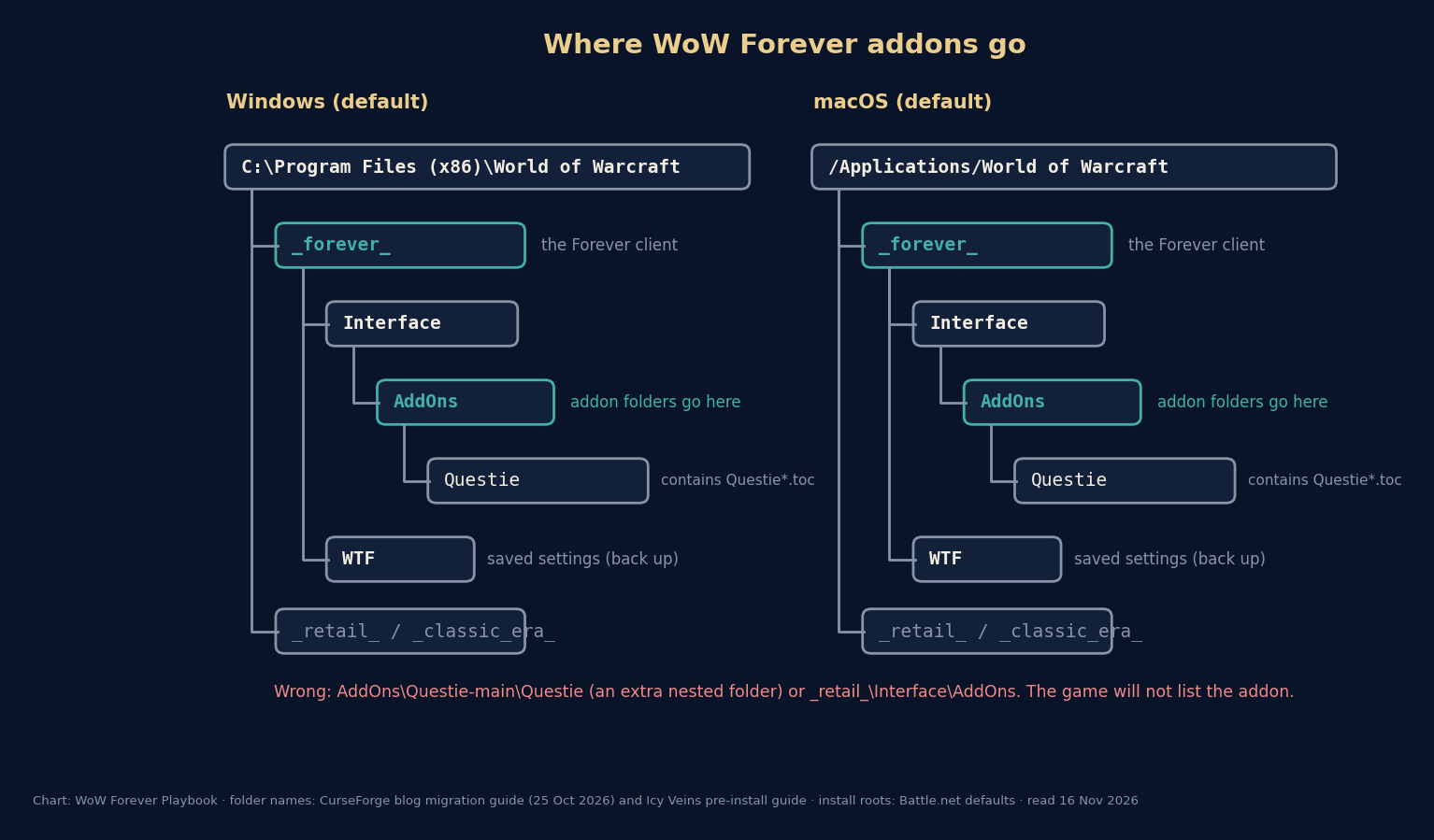
Default paths
Windows:  C:\Program Files (x86)\World of Warcraft\_forever_\Interface\AddOns
macOS:    /Applications/World of Warcraft/_forever_/Interface/AddOns
Settings: ..._forever_\WTF  (saved variables and profiles; back this up)
Install an addon by hand, Windows and macOS
Installing by hand works for any addon, including ones only published on GitHub. The one mistake that causes most 'my addon doesn't show up' posts is nesting: the zip contains a folder inside a folder, so the game finds AddOns\Questie-main\Questie instead of AddOns\Questie. CurseForge's guide warns about the same thing in its own words: 'An extra nested folder, such as Interface\Interface, can leave them in the wrong location.' Close the game before you start. The game reads the AddOns folder only when it starts up.
- Quit World of Warcraft: Forever completely.
- Download the addon's Forever file from its CurseForge, Wago or GitHub page. Check that the file is marked for Forever.
- Windows: right-click the zip, choose Extract All. macOS: double-click the zip in Finder.
- Open the extracted folder and find the folder that contains a file ending in .toc (for Questie, Questie_Forever.toc). That folder is the addon.
- Move that folder into C:\Program Files (x86)\World of Warcraft\_forever_\Interface\AddOns (Windows) or /Applications/World of Warcraft/_forever_/Interface/AddOns (macOS). Some addons ship two or three folders, for example a core and an options module. Move all of them.
- Start the game. On the character select screen, click AddOns in the lower-left corner and tick the addon.
- If the addon is listed as out of date, tick 'Load out of date AddOns' only if its author says the build supports Forever. Otherwise wait for an update.
Install with the CurseForge app (and move your beta addons)
CurseForge lists Forever as its own game flavor. On its website, the Forever filter is game-version type 88568. In the app, the Forever installation shows up as a separate install of World of Warcraft. If your addons do not show up there, CurseForge's migration guide says to 'manually scan the addons folder'. Install addons from inside that Forever view. The app then puts them in _forever_\Interface\AddOns and keeps them updated.
If you played the beta (17 September to 23 October), CurseForge's 25 October guide explains how to carry your addons and their settings over to the live game. Close the game and the app, back up both folders, then copy Interface and WTF from the beta folder (the guide calls it the classic beta folder, _classic_beta_) into _forever_. One step is easy to miss. In WTF\Account, rename the beta account folder, a random string, to your account name, which the Battle.net app shows under 'Game Version & Account'. CurseForge also warns that pasting over an existing live setup overwrites newer addon versions and settings, and that 'Copying files does not update them', so check each one for a Forever-compatible release afterwards.
| Step | What to do | Watch out for |
|---|---|---|
| 1 | Close the game and the CurseForge app; back up the beta and any live Interface and WTF folders | pasting overwrites matching files and settings |
| 2 | Copy Interface and WTF from the beta folder | keep the originals as a backup |
| 3 | Paste both into _forever_ | the result must be _forever_\Interface\AddOns, not Interface\Interface |
| 4 | Rename the beta account folder in WTF\Account to your account name | per-character settings may need separate fixing |
| 5 | In CurseForge, select the Forever install and check for updates; enable addons in game | beta builds may not work on live |
What Forever already does without addons
Before installing a damage meter or a cooldown tracker, check the game's own options. Blizzard's 3 November comparison post says: 'Advanced options in WoW: Forever provide access to elements such as the Cooldown Manager and a Damage Meter.' Both come from modern WoW. The Cooldown Manager is described in Blizzard's beta development notes as a tool that 'is intended to enhance gameplay by pulling critical information from the buff bar or action bar and placing it in a fully customizable location', and it is 'disabled' by default. In the beta it was switched on under the Gameplay Enhancement options. The same notes listed beta limitations: no spell ranks at first, and 'Pet cooldowns cannot be tracked', nor could weapon enhancements such as Windfury or rogue poisons. Blizzard was still extending it after launch. Its 10 November hotfix made the Paladin talent Redoubt trackable in the Cooldown Manager.
So for the two most common reasons people install addons in Classic, a damage meter and buff or cooldown timers, Forever already has a built-in option. Details! is still listed for Forever for players who want more breakdowns than the built-in meter gives. Whether you need an addon at all depends on what the built-in tool does not show you.
| Job | Built into Forever | Addon people add (Forever build on CurseForge) |
|---|---|---|
| Damage and healing meter | Damage Meter (Advanced options) | Details! Damage Meter |
| Cooldown and buff tracking | Cooldown Manager (off by default) | none needed for most players |
| Quest objectives on the map | quest guidance (on by default in the Enhanced preset) | Questie |
| Boss timers | none announced | DBM, BigWigs |
| Bags in one window | one-bag view (on in the Enhanced preset) | Bagnon, Baganator |
Why some Classic addons don't work in Forever
Forever is not built on Classic Era's interface code. Wowhead's 16 September report quotes Blizzard's statement in the WoW UI Discord: Forever 'shares Mainline WoW's UI architecture', and the Midnight addon changes, including the 'secret' values that hide some combat information from addons, apply to it. At BlizzCon, lead encounter designer Mike Nuthals told Kotaku that 'the in-game or in-combat add-on disarmament where the programmatic, the calculations done to automate marking or communicating for players, we're going to bring that over so that players will not have access to those kind of computational add-ons'.
In practice, an addon needs a Forever build to load, and some kinds of combat automation are not allowed at all. You can see the Forever build in an addon's files. Questie ships a separate Questie_Forever.toc that declares '## Interface: 16001', and DBM-Core's .toc lists 16001 among its supported interface versions. Questie's own repository also keeps a 'Forever remaining work' list of items still awaiting in-game validation, so even the addon at the top of CurseForge's Forever popularity sort describes itself as a work in progress. If an addon has no Forever file, ticking 'Load out of date AddOns' usually gives you a stream of Lua errors rather than a working addon.
The addons Forever players use, grouped by job
This list is not a ranking. It is the first page of CurseForge's Forever filter sorted by CurseForge's popularity order on 16 November 2026, sorted into jobs, with near-duplicates and data-only add-ons merged into their parent. Download counts on CurseForge are lifetime totals across every game version, so they say nothing about Forever use and are left out on purpose. Every addon below is listed under CurseForge's Forever flavor. Questie and DBM were also checked against the Forever interface number in their GitHub .toc files. Some names circulating in 'best addons' lists, such as 'ForeverUI', 'ForeverPlus' or a 'Details! (Forever Edition)', did not appear under that filter and are not included.
| Job | Addon (CurseForge page) | What it does | Last update shown |
|---|---|---|---|
| Questing | Questie (+ QuestieDB data) | quest givers, objectives and turn-ins on the map and tooltips | 14 Nov (QuestieDB 16 Nov) |
| Questing | RestedXP Guide | step-by-step leveling guide in game | 15 Nov |
| Auction house | Auctionator | faster searching, posting and price history | 14 Nov |
| Auction house | TradeSkillMaster | full auction and crafting economy suite | 13 Nov |
| Damage meter | Details! Damage Meter | detailed damage, healing and threat breakdowns | 9 Nov |
| Boss timers | DBM - Deadly Boss Mods (+ 'DBM - Forever and Vanilla') | encounter warnings; the Forever module has 'Boss mods for all Forever raids' | 13 Nov / 10 Nov |
| Boss timers | BigWigs (+ LittleWigs for dungeons) | encounter timers and warnings | 16 Nov |
| Bags | Bagnon / Baganator | all bags in one window, with search | 15–16 Nov |
| Map and travel | Leatrix Maps, TomTom, HandyNotes | map improvements, waypoints and map notes | 3–12 Nov |
| Gathering and rares | GatherMate2, RareScanner | herb and ore node history; rare spawn alerts | 14–16 Nov |
| Quality of life | Leatrix Plus | dozens of small interface options | 11 Nov |
| Class training | What's Training? | which spells your trainer has for you and their cost | 15 Nov |
| Loot lookup | AtlasLoot Classic Forever | browse dungeon and raid loot tables in game | 16 Nov |
| Interface | Plater Nameplates, Bartender4, Pawn | nameplates; action bars; gear upgrade scores | 13–16 Nov |
| Errors | BugSack + BugGrabber | catch Lua errors quietly instead of pop-ups | 21–26 Oct |
Troubleshooting: the five causes of a missing or broken addon
Almost every 'addon not working in Forever' thread comes down to one of five causes, in this order of likelihood. Work down the list before reinstalling anything.
- Wrong game folder. The addon is in _retail_ or _classic_era_ instead of _forever_. Check the path in the first section.
- Nested folder. The folder inside AddOns is not the one with the .toc file. Move the inner folder up one level.
- Not enabled. New addons can be unticked in the AddOns list on the character screen, and some are enabled per character.
- No Forever build. The addon shows as out of date or throws Lua errors. Check its page for a Forever file. Classic Era files declare a different interface version.
- Old saved settings. A profile copied from the beta, or from a broken version, can cause errors. Move that addon's file out of _forever_\WTF\Account\<account>\SavedVariables (keep a copy) and log in again.
Our approach to this list
Every addon page linked from this article is the project's own CurseForge page, so you download from the author's official release channel and not from a mirror. We do not claim that any addon is the 'best' or 'must have'. Which ones you need depends on your class, your ruleset and how much of Forever's built-in interface you like. The list will change as authors ship Forever builds. We will re-check the Forever filter and update this page when the raids open on 9 December, when boss addons matter most.
Questions people ask
- Where is the WoW Forever addons folder?
- In the _forever_ subfolder of your World of Warcraft folder: C:\Program Files (x86)\World of Warcraft\_forever_\Interface\AddOns on a default Windows install, /Applications/World of Warcraft/_forever_/Interface/AddOns on macOS.
- Do Classic Era addons work in WoW Forever?
- Only if the author has released a Forever build. Forever uses modern WoW's interface code and Midnight's addon restrictions, so most addons need a separate Forever version.
- Does WoW Forever have a built-in damage meter?
- Yes. Blizzard says the Advanced options include a Damage Meter and a Cooldown Manager.
- Can I use the CurseForge app for WoW Forever?
- Yes. CurseForge lists Forever as its own flavor. Select the Forever installation in the app; if your addons are not recognised, CurseForge says to scan the addons folder manually.
- Is Questie available for WoW Forever?
- Yes. Questie ships a Forever version (Questie_Forever.toc, interface 16001) and is listed under CurseForge's Forever flavor.
Sources & further reading
- Blizzard — 'WoW: Forever—What's New and What Feels Familiar' (modern-WoW comparison, one subscription for both, Cooldown Manager and Damage Meter, 16 Legacy Points, one faction on PvP), 3 Nov 2026, read 6 Nov 2026
- Wowhead — 'WoW: Forever Will Have Addon Changes from Midnight' (quotes Blizzard's statement in the WoW UI Discord), Squishei, 16 Sep 2026
- Kotaku — '8 New Things We Learned About World of Warcraft: Forever From Its Lead Designers' (Tim Jones, Mike Nuthals), Rebekah Valentine, 14 Sep 2026
- Blizzard (Kaivax) — 'WoW Forever Beta Development Notes – Updated November 2' (Cooldown Manager, pet happiness fix, Tame Beast level rule, Furious Howl), official forums, read 16 Nov 2026
- Blizzard — 'WoW: Forever Hotfixes - November 13, 2026' (running list, entries 5–13 Nov: pet health 150% → 115%, Zephras pet families, Bloodmaster's Ring, Riverglades fixes, Cooldown Manager), read 16 Nov 2026
- Blizzard — 'UI Add-On Development Policy' (add-ons must be free, code visible, no ads), official forums, read 16 Nov 2026
- CurseForge Blog — 'How to Migrate WoW Forever Addons from Beta to Live', Niv Hajaj, 25 Oct 2026 (folder _forever_, Interface\AddOns, WTF), read 16 Nov 2026
- Icy Veins — 'Get WoW Forever Ready to Play: Pre-Install Your Addons Early' (World of Warcraft/_forever_/Interface/AddOns), read via search 16 Nov 2026
- CurseForge — World of Warcraft addons, Forever flavor filter (gameVersionTypeId 88568), sorted by popularity, read 16 Nov 2026
- GitHub — Questie/Questie: Questie_Forever.toc ('## Interface: 16001') and FOREVER_WORK_LEFT_TO_DO.md, read 16 Nov 2026
- GitHub — DeadlyBossMods/DeadlyBossMods: DBM-Core.toc (interface list includes 16001, the Forever client), read 16 Nov 2026
- CurseForge — Questie ('The Classic Quest Helper'; Forever flavor, 1.60.1), read 16 Nov 2026
- CurseForge — Auctionator (Forever flavor), read 16 Nov 2026
- CurseForge — Details! Damage Meter (Forever file Details.20261109), read 16 Nov 2026
- CurseForge — DBM - Deadly Boss Mods (DBM-Core) and 'DBM - Forever and Vanilla' ('Boss mods for all Forever raids'), read 16 Nov 2026
- CurseForge — BigWigs (Forever flavor), read 16 Nov 2026
- CurseForge — Bagnon and Baganator (Forever flavor), read 16 Nov 2026
- CurseForge — Leatrix Plus and Leatrix Maps (Forever flavor), read 16 Nov 2026
- CurseForge — TomTom, RareScanner, GatherMate2 and HandyNotes (Forever flavor), read 16 Nov 2026
- CurseForge — What's Training? (Forever flavor), read 16 Nov 2026
- CurseForge — AtlasLoot Classic Forever (Forever flavor), read 16 Nov 2026
- CurseForge — Plater Nameplates, Bartender4 and Pawn (Forever flavor), read 16 Nov 2026
- CurseForge — TradeSkillMaster (Forever flavor), read 16 Nov 2026
- CurseForge — BugSack and BugGrabber (error catchers; Forever flavor), read 16 Nov 2026
- CurseForge — RestedXP Guide (Forever flavor), read 16 Nov 2026
- Blizzard (Kaivax) — 'Thank You For Testing the WoW Forever Beta', official forums thread 2390466, 23 Oct 2026 17:01 UTC ('The WoW Forever Beta is now closed'), read 16 Nov 2026
Read next
- WoW Forever Classic vs Enhanced
WoW Forever Classic vs Enhanced is a first-login preset, not a ruleset or skill level. Six settings compared, Blizzard's advice, and how to change it later.
- WoW Forever Returning Player Guide
WoW Forever returning player guide: recover an old account, check its region and licence, and see how realms, races, names and PvP have changed.
- WoW Forever Controller Support
WoW Forever controller support works with all XInput controllers. The full button map, how to switch it on, the 84 action slots and what needs a keyboard.
- WoW Forever System Requirements
WoW Forever system requirements: Windows 10, 8 GB RAM, a 4 GB GTX 10-series GPU, 128 GB SSD; Mac needs macOS 12 and an M2. Full specs and how to check.
- WoW Forever guide
WoW Forever guide for beginners: what to do first, step by step, the tools to open, and a page for every system, from camping and Legacy to rulesets.
- WoW Forever raids
WoW Forever raids: the Barrow Deeps (10 players, 8 bosses), Hyjal Summit (20, 13 bosses) and Onyxia's Lair (40) unlock 9 December 2026 and reset weekly.
Part of WoW Forever guide. Back to the WoW Forever Playbook home page.

Sukie · Editor
Sukie runs WoW Forever Playbook. She reads every Blizzard article, panel recap and forum post about World of Warcraft: Forever, checks each number against the source before it goes on a page, and rewrites anything a later Blizzard post contradicts. The focus is narrow on purpose: what Blizzard has actually said, with the source attached.
About this site · How pages are checked · Last updated November 16, 2026
WoW Forever Playbook is an unofficial fan site. It is not affiliated with, endorsed by or associated with Blizzard Entertainment. Game names, images and trademarks belong to their owners.